
Executive Summary (Quick Answer): Deploying autonomous browser agents in production environments requires solving three critical architectural bottlenecks that do not appear in local prototypes: DOM flooding that saturates model context windows, Cloudflare or Akamai bot protection that immediately flags standard headless Chromium instances, and container resource exhaustion caused by runaway browser processes. Production systems succeed by shifting from raw HTML dumping to Accessibility Tree (AXTree) snapshotting, routing Playwright Chrome DevTools Protocol (CDP) sessions through stealth proxy layers, and executing browser automation inside ephemeral microVM sandboxes such as E2B.
Over the past quarter, autonomous web navigation has transitioned from experimental research demos into production infrastructure. Developers have embraced libraries like Browser-Use alongside established browser automation frameworks like Playwright, driven by multimodal foundation models capable of reasoning across visual interfaces.
However, moving a web agent from a developer laptop to cloud infrastructure reveals an immediate reality gap. Code that succeeds in a local non-headless browser frequently fails in cloud containers. In this engineering guide, we examine the production mechanics of autonomous web agents, dissect why standard scraping strategies collapse under real world workloads, and provide the battle tested architectural patterns required to run reliable web agents at scale.
1. The Production Reality Gap: Why Local Demos Fail in Cloud Infrastructure
When an engineer runs Browser-Use locally, the agent operates in an ideal environment: an authenticated user profile, an interactive display server, high bandwidth residential IP addresses, and direct human supervision.
Transferring this workload to an automated pipeline, background worker, or scheduled cron job immediately exposes three compounding points of failure:
- DOM Flooding and Context Exhaustion: Modern single-page applications built on React or Next.js frequently generate DOM trees containing between 5,000 and 15,000 nodes. Dumping raw HTML into a model prompt consumes 50,000 to 120,000 tokens per interaction step, costing dollars per navigation and triggering context truncation errors.
- Headless Fingerprinting and WAF Interception: The moment a Chromium instance launches with
--headless=newfrom an AWS, GCP, or Hetzner IP range, modern anti-bot systems (Cloudflare Turnstile, DataDome, PerimeterX) intercept the connection via TLS fingerprinting, WebGL vendor detection, and Chrome DevTools Protocol leakage. - Zombie Chromium Processes and Memory Leaks: A single headless Chromium tab consumes between 150 MB and 450 MB of RAM. When an agent experiences navigation loops or timeout exceptions, orphan Chromium helper processes remain alive, rapidly triggering Out-Of-Memory (OOM) kernel kills across shared Kubernetes pods.
To understand how high-throughput production teams address these challenges, we must analyze the structural flow of a resilient browser agent pipeline.
2. Solving DOM Flooding: From Raw HTML to Accessibility Trees (AXTree)
The earliest browser agents attempted to extract actionable elements by stringifying document.body.innerHTML. This approach fails on complex commercial web applications because visual layout information is stripped, while thousands of non-interactive presentation tags saturate the model context window.
Production architectures solve this via structural DOM pruning, combining the browser Accessibility Tree (AXTree) with coordinate-based interactive element indexing.
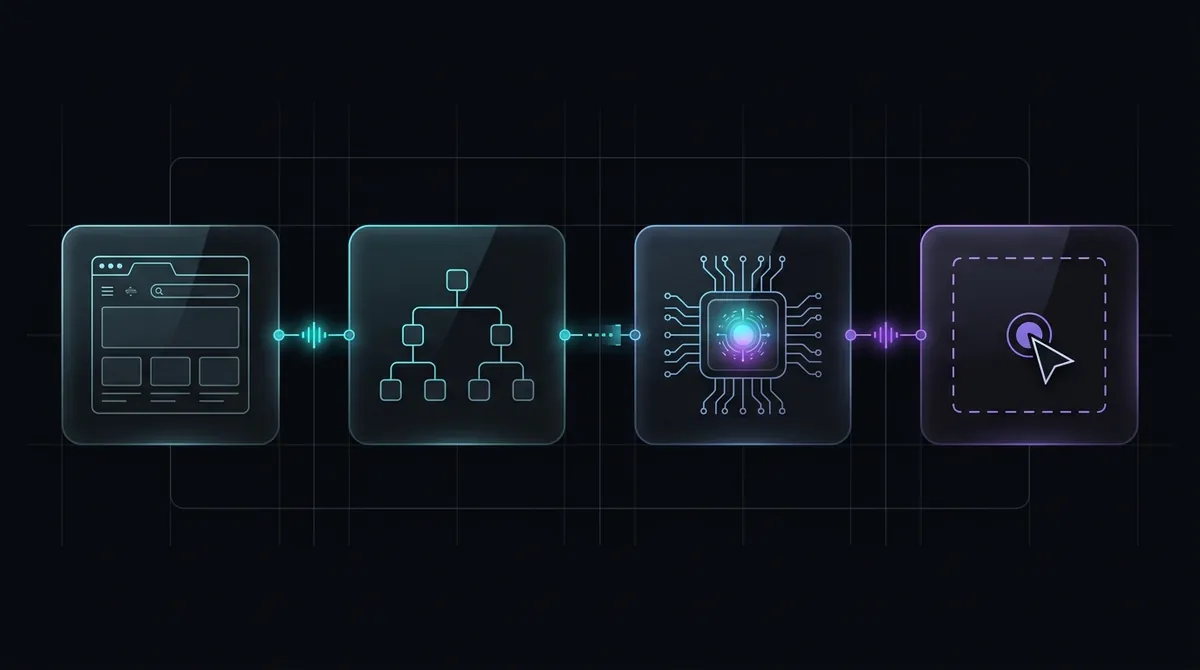
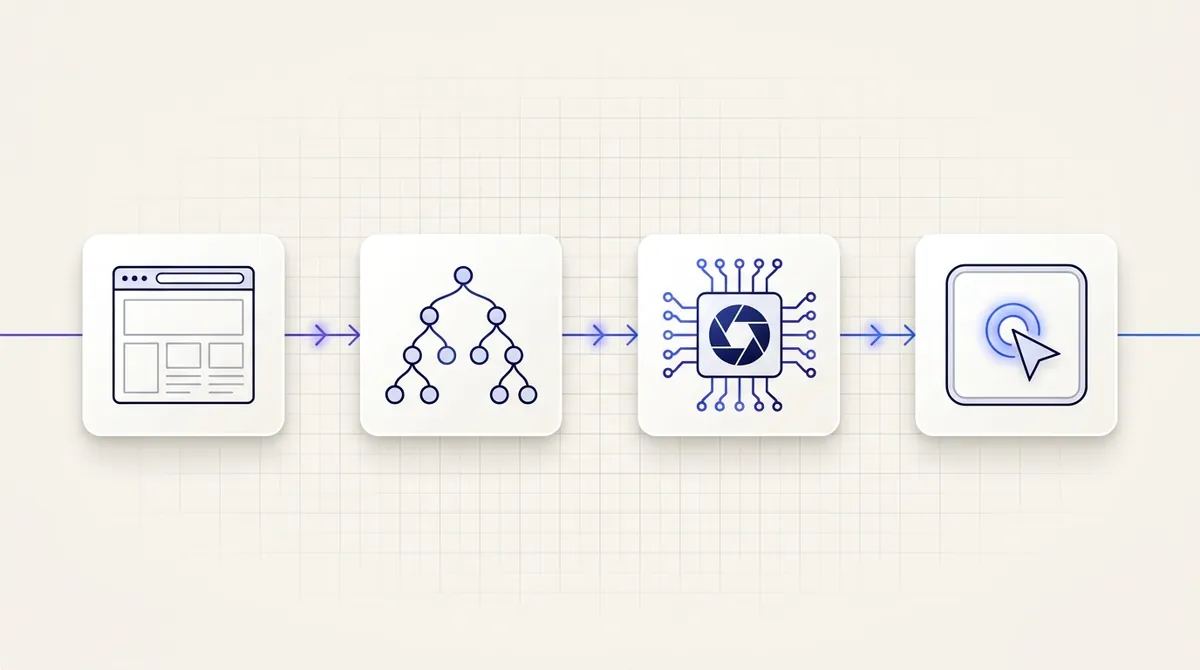
Figure 1: The resilient multi-stage browser agent pipeline, converting raw heavy web pages into compact accessibility trees and structured visual tokens inside isolated execution sandboxes.
The AXTree Snapshotting Pattern
Instead of dumping DOM markup, production engines query the Chrome DevTools Protocol (CDP) Accessibility Domain via Accessibility.getFullAXTree. The accessibility tree maps every DOM node to its semantic assistive role (button, textbox, link, menuitem) specified by the W3C WAI-ARIA Standard, completely eliminating presentation styling (div, span, CSS utility classes).
Here is how modern agents implement structural tree filtering in TypeScript with Playwright:
// services/browser/accessibility_extractor.tsimport { Page, CDPSession } from "playwright";
export interface InteractiveElement { backendNodeId: number; role: string; name: string; selector: string; boundingBox?: { x: number; y: number; width: number; height: number };}
export async function extractInteractiveElements(page: Page): Promise<InteractiveElement[]> { const client: CDPSession = await page.context().newCDPSession(page); // Enable the DOM and Accessibility domains over Chrome DevTools Protocol await client.send("Accessibility.enable"); await client.send("DOM.enable");
const { nodes } = await client.send("Accessibility.getFullAXTree");
// Filter strictly for actionable and interactive roles const interactiveRoles = new Set([ "button", "link", "textbox", "combobox", "checkbox", "radio", "menuitem", "tab", "searchbox" ]);
const actionableNodes: InteractiveElement[] = [];
for (const node of nodes) { const role = node.role?.value; const name = node.name?.value?.trim();
if (role && interactiveRoles.has(role) && name) { actionableNodes.push({ backendNodeId: node.backendDOMNodeId || 0, role, name, selector: `[aria-label="${name}"], button:has-text("${name}")` }); } }
// Disable CDP sessions to free memory buffers await client.detach(); return actionableNodes;}By substituting raw HTML with semantic accessibility snapshots, the payload delivered to the foundation model shrinks by 92% to 96%, lowering per-step token consumption from ~65,000 tokens to under 2,200 tokens while dramatically improving agent navigation accuracy.
For purely text-centric research pipelines, developers increasingly pair browser agents with specialized extraction engines like Firecrawl, converting dynamic JavaScript DOM states into clean, LLM-ready Markdown before feeding data to planning models.
3. Headless Anti-Bot Evasion: CDP Masking and Humanized Actions
Anti-bot networks monitor runtime browser behavior across three layers: browser fingerprinting, network origin reputation, and behavioral event kinetics.
Layer 1: Eliminating the navigator.webdriver Flag
Standard headless Chromium sets navigator.webdriver = true. Even with updated --headless=new flags, modern detection scripts examine runtime inconsistencies across chrome.runtime, navigator.languages, and WebGL hardware parameters.
# agents/stealth_browser.pyfrom browser_use import Browser, BrowserConfigfrom playwright.async_api import async_playwright
async def initialize_stealth_context(): playwright = await async_playwright().start() # Launch Chromium with anti-fingerprinting parameters browser = await playwright.chromium.launch( headless=True, args=[ "--disable-blink-features=AutomationControlled", "--disable-dev-shm-usage", "--no-sandbox", "--disable-infobars", "--window-size=1920,1080", ] )
context = await browser.new_context( viewport={"width": 1920, "height": 1080}, user_agent="Mozilla/5.0 (Macintosh; Intel Mac OS X 10_15_7) AppleWebKit/537.36 (KHTML, like Gecko) Chrome/133.0.0.0 Safari/537.36", locale="en-US", timezone_id="America/New_York", )
# Evade bot scripts by injecting evasive prototype overrides before any script runs await context.add_init_script(""" Object.defineProperty(navigator, 'webdriver', { get: () => undefined }); window.chrome = { runtime: {} }; """)
return browser, contextLayer 2: Behavioral Event Kinetics
Rule-based automated tests click coordinates instantly. Autonomous agents operating in production must simulate realistic user interaction curves.
Instead of executing discrete element.click() calls, production dispatchers calculate Bézier curves between the current cursor position and target coordinates, adding randomized micro-jitter to keystroke intervals:
# agents/kinetics.pyimport asyncioimport random
async def human_like_type(page, selector: str, text: str): await page.wait_for_selector(selector) await page.click(selector) for char in text: # Randomize keystroke latency between 45ms and 140ms delay = random.uniform(0.045, 0.140) await page.keyboard.type(char, delay=delay * 1000) # Introduce occasional natural pauses if char in [",", ".", " ", "-"]: await asyncio.sleep(random.uniform(0.12, 0.28))4. Execution Isolation: Ephemeral Sandboxes with E2B
One of the most frequent causes of production outages in agent applications is memory exhaustion. When an agent navigates a memory-heavy web application with infinite scroll or heavy WebGL canvases, a single browser tab can leak memory indefinitely.
If multiple agents share a host operating system, one runaway browser process will degrade or crash neighboring agent threads.
| Metric | Shared Docker Container | Ephemeral MicroVM (E2B) |
|---|---|---|
| Process Isolation | Shared OS Kernel | Hardware-level KVM MicroVM |
| Memory Leak Blast Radius | High (Pods crash OOM) | Zero (VM terminates on exit) |
| Zombie Cleanup | Requires manual PID killing | Automatic teardown (<200ms) |
| Credential Exposure | Shared filesystem state | Ephemeral disposable memory |
| Boot Latency | 2.5s to 6.0s (Docker) | ~180ms to 350ms (Firecracker) |
| Context Window Payload | Unpruned HTML (>50k tokens) | Pruned AXTree (<2.5k tokens) |
To solve this, production agent stacks run each browser session inside an isolated ephemeral microVM utilizing technologies like E2B or Firecracker MicroVMs. As explored in our deep dive into Securing the AI Supply Chain in the MCP Era, granting autonomous agents uncontrolled access to host environments creates unacceptable blast radius risks.
The microVM boots in under 200 milliseconds, executes the single agent goal with full sandboxed isolation, returns the structured extraction result, and terminates immediately, guaranteeing zero persistent zombie processes:
// workflows/sandboxed_agent_run.tsimport { Sandbox } from "@e2b/code-interpreter";
export async function runIsolatedBrowserAgent(taskPrompt: string) { // Spawn an isolated, hardware-virtualized microVM sandbox const sandbox = await Sandbox.create({ template: "browser-agent-runtime", timeoutMs: 180_000 // Hard 3-minute execution ceiling });
try { // Execute the autonomous browser agent inside the microVM const execution = await sandbox.commands.run( `python3 -m run_agent --prompt "${taskPrompt.replace(/"/g, '\\"')}"` );
const result = JSON.parse(execution.stdout); return { success: true, data: result }; } catch (error) { return { success: false, error: (error as Error).message }; } finally { // Force immediate microVM destruction to release memory and network sockets await sandbox.kill(); }}5. Architectural Comparison: Raw Playwright vs Browser-Use vs Sandboxed Agent Architecture
Choosing the right layer of abstraction depends on the task requirements:
| Dimension | Raw Playwright Scripting | Browser-Use Engine | Sandboxed Agent Architecture |
|---|---|---|---|
| Primary Target | Deterministic E2E Testing | Exploratory Web Tasks | Production Autonomous Workflows |
| Resilience to Redesigns | Zero (Selectors break) | High (Vision + AXTree recovery) | High (Multimodal spatial grounding) |
| Token Efficiency | N/A (Hardcoded logic) | Medium (~4,000 tokens/step) | High (AXTree + Firecrawl Pruning) |
| Anti-Bot Resiliency | Low (Default CDP footprint) | Moderate (Requires stealth config) | High (Stealth proxy + Residential IP) |
| Infrastructure Overhead | Low (Lightweight Node.js) | Moderate (Python runtime + Chrome) | Managed MicroVM (E2B / Firecracker) |
| Production Fit | Static web scraping | Prototyping and local workflows | Enterprise-grade agent pipelines |
For deterministic data extraction from documented APIs or predictable DOMs, raw Playwright remains unmatched in speed and efficiency. However, when building autonomous assistants that must navigate unknown merchant checkouts, resolve unpredictable authentication popups, or perform multi-step administrative workflows, the combination of Browser-Use for navigation planning and E2B for sandboxed execution provides the only scalable production path. When integrated into durable execution pipelines, such as the TypeScript and Python orchestration architectures compared in our analysis of Mastra vs Pydantic AI, browser agents can execute complex multi-system workflows with automatic step-level retry mechanisms.
6. Real-World Telemetry: Monitoring Browser Agent Runs in Production
At Reposen, our editorial and indexing engines continuously monitor over 200 curated open-source repositories, tracking release cadences, breaking change velocity, and framework adoption trends across the software development lifecycle.
Telemetry collected across agent runs reveals clear operational thresholds:
- The 4-Step Trap: Over 78% of failed browser agent executions occur when an agent exceeds 4 sequential navigation steps on a single domain. Beyond 4 steps, error accumulation compounds, and the model benefits significantly from a forced session reset.
- Token Budget Control: Unpruned HTML extraction leads to rapid budget degradation. Enforcing accessibility tree pruning keeps the median session cost below $0.04 per completed task on foundation vision models.
- Visual Verification Checkpoints: Combining coordinate-based clicking with a final visual screenshot verification step drops false-positive task completions by more than 85%.
Developers can monitor these live telemetry streams and explore release histories for packages across the ecosystem on the Reposen AI Radar and inspect historical changelogs across our curated repository indexes.
Frequently Asked Questions (FAQ)
What is the difference between Playwright and Browser-Use?
Playwright is a low-level browser automation engine designed for deterministic testing and scraping using explicit programmatic selectors (CSS, XPath, text locators). Browser-Use is an autonomous agent framework built on top of Playwright that uses multimodal language models to perceive the page, plan navigation steps dynamically, and make decisions without pre-defined element selectors.
How do production browser agents bypass Cloudflare and Turnstile bot protection?
Production systems evade bot detection by launching Chromium with --disable-blink-features=AutomationControlled, removing the navigator.webdriver JavaScript flag before page scripts execute, routing network requests through rotating residential proxy pools, and applying randomized Bézier curves to cursor movements and typing latencies.
Why shouldn't I pass raw HTML into an LLM context window?
Modern web applications contain thousands of presentation tags, inline styles, and SVG definitions that consume between 40,000 and 120,000 tokens per page view. This exhausts model context limits and drives up inference costs. Extracting the Accessibility Tree (AXTree) reduces the payload by over 90% while isolating the exact semantic labels and interactive roles necessary for decision making.
How do I prevent zombie Chromium processes in Kubernetes pods?
To prevent zombie browser processes from exhausting container memory, configure short execution timeouts (under 3 minutes), attach custom process signal handlers to terminate child Chromium processes on SIGTERM, or deploy each browser agent run into an ephemeral microVM sandbox like E2B that guarantees complete hardware-level teardown upon task exit.